Task list: one list, sorted by what pays off most
Not a report you have to interpret. A list you can work your way down.
At the top is whatever brings the most new visitors for the least work.
How does a finding become a task?
Every finding, whether it comes from Search Console or from the site audit, is converted into an estimated number of visitors and an assessment of how much work it takes. The two numbers are multiplied into a priority, and the list is sorted by it. That is why a missing comma in a title can sit above a whole new section: it takes two minutes and moves a hundred visitors.
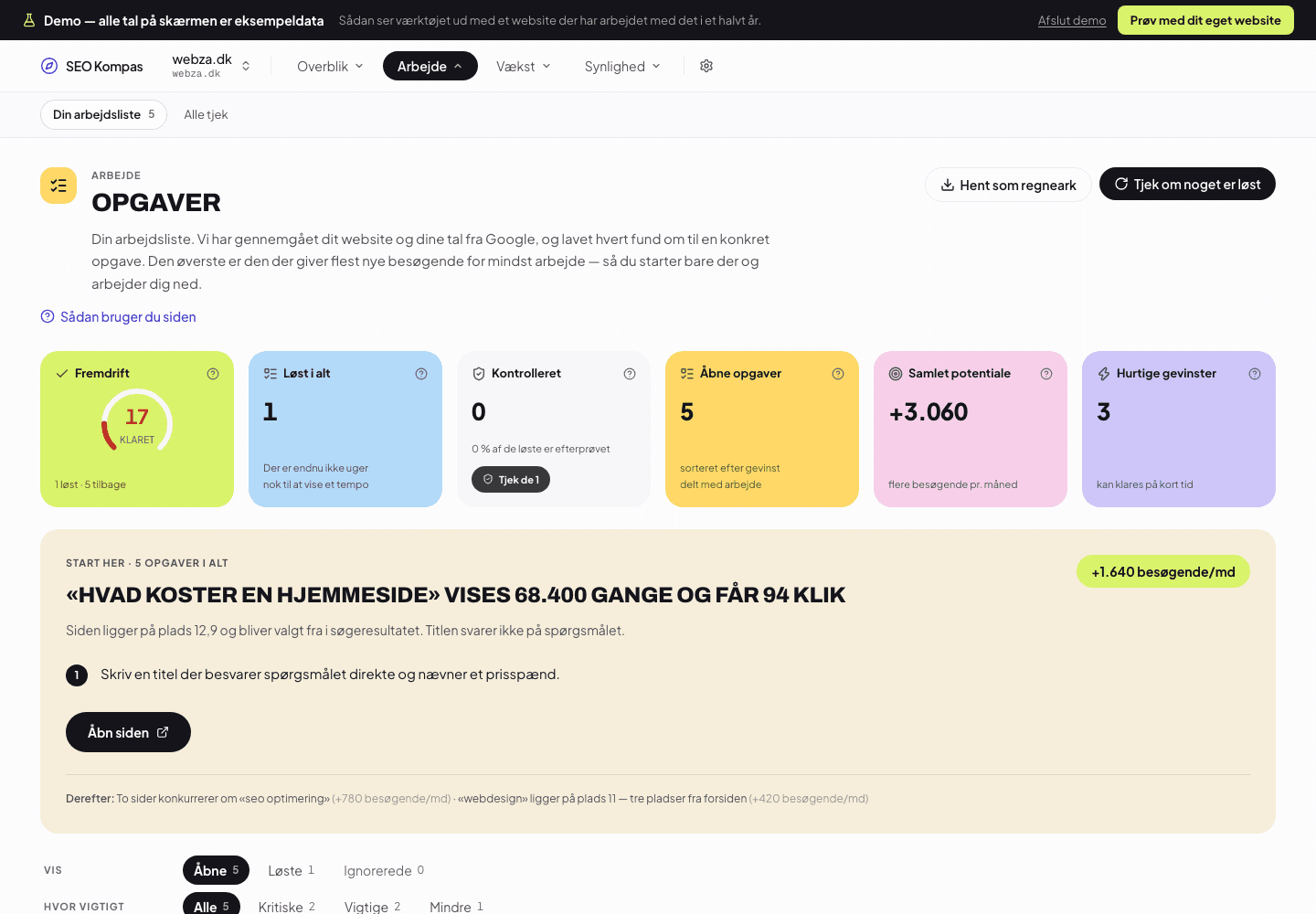
What does "about 1,640 more visitors a month" mean?
It is an estimate, and we say so. It is calculated from how many times the page was actually shown in Google over the last 28 days, and what the average click-through rate is at the position it holds. If the page moves up as expected, that is the number of extra clicks. It is not a promise: it is a way of sorting fifteen tasks so you do not start with the wrong one.
Who checks that I have done it?
The tool does. At the next site audit we test every open finding again: is the title there now, has the link been fixed, has the description been written? If so, the task closes by itself and moves to the solved ones. There is also a button that checks a whole category straight away, if you have just fixed a handful of things and do not want to wait for the weekly run.
Can I remove something I do not want to fix?
Yes. Any finding can be put away, and then it is not counted in the numbers either; otherwise it would still say "3" above an empty list. There are two reasons to want that: some findings are deliberate choices, and some pages are simply not meant to rank.
There is always one place to start, and it says what to write.
- 1At the top is one task: which page, which search query, and what it is worth in visitors.
- 2Below it are the steps, and a button that opens the page in question.
- 3At the bottom it says what comes next, so you can see whether it is worth carrying on.
And the next time we go through the website, we check for ourselves whether it was done.
Questions and answers
- How many tasks will I get?
- As many as there are findings. On a typical website with a few hundred pages that is between ten and fifty. They are sorted, so you never need to look further than the top one.
- Can I export the list?
- Yes, as a spreadsheet. That is typically used when the work is handed to a developer or a copywriter who does not have access to the tool.
- What if I disagree with the prioritisation?
- Then you simply work somewhere else in the list. The order is a suggestion built on numbers, not a lock, and you know your website better than we do.
Try it on your own website
Enter your domain. We fetch the home page and take a look, free and without logging in.
Free and without login. We fetch your homepage and take a look. It takes a couple of seconds.
See what the check looks for before you enter your domain.
The rest of the tool
Keywords and rankings
Search Console shows what happened. We show what to do about it.
Read more
Link strength
A link is a recommendation. We show who recommends you, and who is just making noise.
Read more
Technical health
We go through every single page, not just the home page. And we say who needs to fix what.
Read more
Growth plan
Most SEO tools stall at zero. This is the plan that comes before.
Read more
AI visibility
Ranking number one is no longer enough. Someone has to cite you.
Read more
Reports
For the boss, the client or the board, without anyone having to log in.
Read more